
Accounts. Budgets. Goals. Widgets. Reports.
Your everyday financial cockpit.
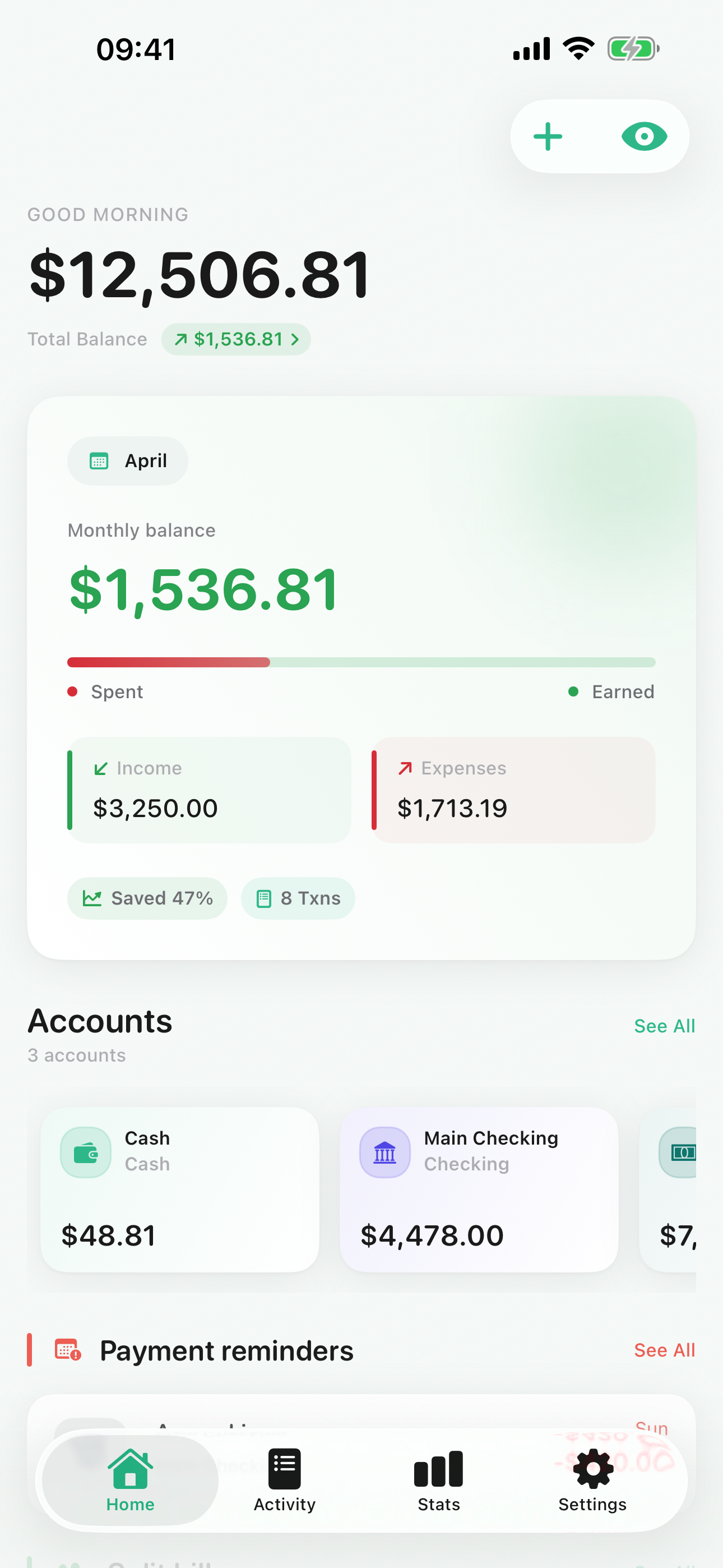
Pockpit brings accounts, transactions, budgets, savings goals, recurring payments, reports, and backups into one focused iPhone experience that feels fast, clear, and private.
Local-first
Budgets with rollover
CSV & PDF reports
Built for fast daily logging
Private by design
Recurring reminders included
Reports and backups ready
Accounts
All balances in one place
Track cash, checking, savings, credit cards, and custom accounts with one current overview.
Transactions
Fast logging with categories, tags, and receipts
Capture income, expenses, transfers, notes, tags, and receipt images without breaking flow.
Budgets
Monthly budgets with rollover
Set category budgets, carry remaining amounts forward, or account for overspending in the next month.
Goals
Savings goals that stay tangible
Follow progress toward short-term and long-term targets without losing sight of your actual account balances.
Recurring
Recurring transactions and reminders
Plan subscriptions, rent, salaries, and other repeating items with clear next dates and useful notifications.
Security
Private by design, secure by default
Use app lock, local backups, and a privacy-focused setup that keeps financial data under your control.
Control
Transfers and account limits
Model cash, checking, overdraft, and credit card flows with negative-balance rules that actually fit the account.
Reports
CSV exports, PDF reports, and backups
Export raw data, generate structured monthly or yearly reports, and keep a portable backup of your finances.
Widgets
Your finances on your home screen
Glance at account balances, budget status, or upcoming payments without unlocking your phone.
Split Bills
Track shared expenses with anyone
Log shared costs, split amounts, and keep track of who owes what — without leaving your financial overview.
Reminders
Never miss a payment
Set custom notifications for upcoming bills, due dates, and one-time payments so nothing slips through.
Designed with purpose
Your money, organized the way your life actually works.
See what matters first
Home focuses on balances, current month movement, budget pressure, and upcoming recurring items.
Plan ahead with context
Budgets, savings goals, and recurring templates are connected, so planning is grounded in actual account reality.
Export what you need
Create CSV exports for spreadsheets, polished PDF reports for monthly reviews, and JSON backups for peace of mind.
Reports and review
From daily logging to monthly clarity in three steps.
Capture daily activity
Log transactions, receipts, transfers, and recurring items as they happen.
Watch budgets and goals
Stay ahead with rollover budgets, savings targets, and reminders for what is coming next.
Export and reflect
Generate CSV exports, detailed PDF reports, or full backups whenever you need a clean review cycle.
App Screens
Swipe through the app and explore every view.
Pricing
Simple, transparent pricing.
Free
€0
free forever
- 10 transactions / month
- 1 budget
- 1 savings goal
- 1 recurring payment
- Payment Reminders
- Receipt scanning & auto-fill
- Split Bills
- Accounts
Pro
€2,99
/ month
or €29.99 / year
- Unlimited transactions
- Unlimited budgets
- Unlimited savings goals
- Unlimited recurring payments
- Custom categories
- Advanced statistics & charts
- PDF and CSV export
- Notifications & reminders
- Payment Reminders
- Receipt scanning & auto-fill
- Split Bills
- Accounts
FAQ
Common questions about Pockpit.
Can I use Pockpit with multiple accounts and cards?
Yes. Pockpit is built around multi-account tracking, including cash, checking, savings, credit cards, and custom accounts.
Does Pockpit support monthly budgets?
Yes. You can set monthly category budgets and choose rollover behavior for remaining budget or overspending.
Can I track recurring subscriptions, rent, or salary?
Yes. Recurring transactions can post automatically, show the next due date, and trigger useful reminder notifications.
Can I create reports or export my data?
Yes. Pockpit supports CSV export, monthly and yearly PDF reports, and full JSON backups.
Can Pockpit handle credit cards or overdraft limits?
Yes. Accounts can allow negative balances and optional limits, which is useful for credit cards and overdraft scenarios.
Is my data private?
Pockpit is designed around privacy, offers app lock, and gives you direct control through exports and backups.
Does Pockpit have home screen widgets?
Yes. Pockpit includes widgets to display account balances, budget status, or upcoming payments directly on your iPhone home screen.
Can I split bills and track shared expenses?
Yes. Pockpit lets you log shared costs, split amounts between people, and keep track of who owes what.
Ready to start
Bring your accounts, budgets, and goals into one cockpit.
Made for iPhone. Focused on clarity. Built for real financial routines.